
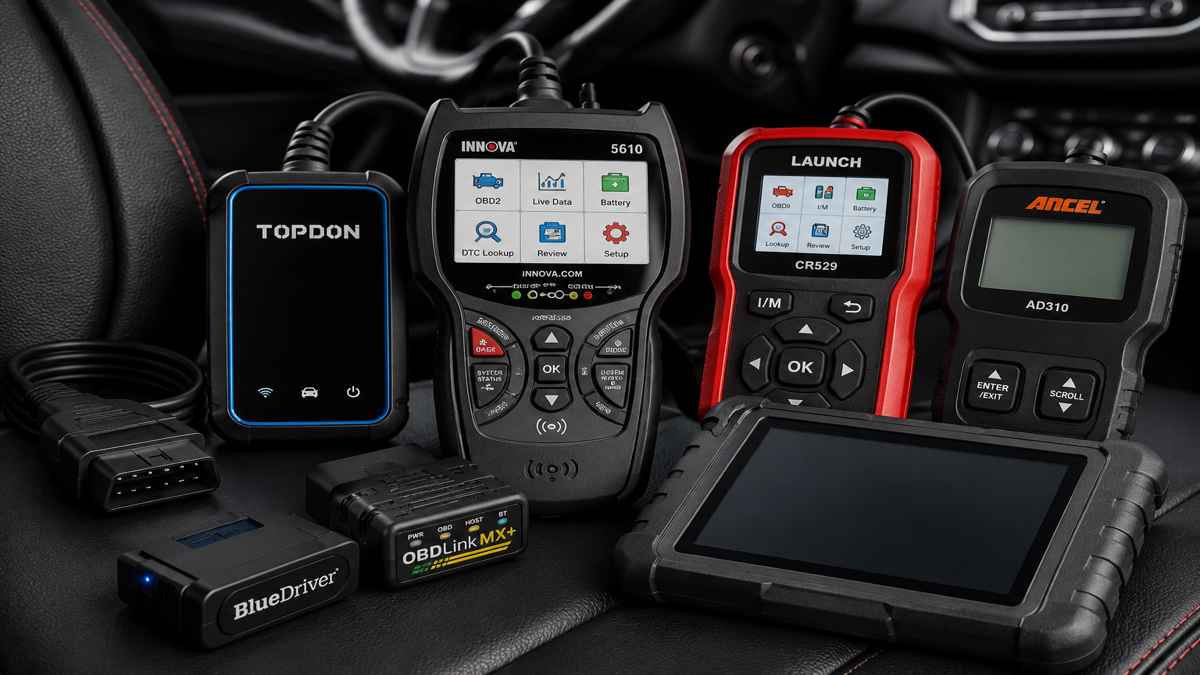
Last updated: June 14, 2026. This research-based best OBD2 scanner guide compares scanner types, feature depth, compatibility risks, subscription issues, and common diagnostic use cases. We do not claim hands-on testing unless a product review page clearly says so.
Affiliate disclosure: This page may contain affiliate links. If you buy through qualifying links, we may earn a commission at no extra cost to you. Read our Affiliate Disclosure.
The best OBD2 scanner for most drivers is the tool that matches the problem, vehicle, and skill level. A basic code reader can handle a check engine light. A Bluetooth OBD2 scanner can make reports and live-data graphs easier to read. An enhanced scan tool is better if you need ABS, SRS, transmission, bidirectional controls, or service reset functions.
- Best overall: Innova 5610 for serious DIY users who want live data, enhanced diagnostics, and reset functions.
- Best Bluetooth option: TOPDON TopScan for phone-based diagnostics, with subscription terms checked before buying.
- Best budget direction: Launch CR529 or ANCEL AD310, depending on whether live data matters.
- Best pro-style choice: TOPDON Phoenix Lite 2 for advanced users who need deeper system coverage.
Best OBD2 Scanners: Quick Verdict
| Pick | Best for | Scanner type | Why it makes sense |
|---|---|---|---|
| Innova 5610 | Best overall for serious DIY | Advanced handheld | Strong balance of live data, enhanced diagnostics, repair guidance, and service functions. |
| TOPDON TopScan | Best Bluetooth OBD2 scanner | App-based adapter | Compact phone-based scanner with full OBD2 functions and deeper feature tiers. |
| Launch CR529 | Best low-cost live data reader | Budget handheld | Good fit when you want live data and I/M readiness without paying for pro features. |
| ANCEL AD310 | Best simple budget code reader | Basic handheld | Simple check-engine-light reader for codes, freeze frame, live data, and readiness checks. |
| BlueDriver Bluetooth Pro | Best guided repair app | Bluetooth app scanner | Strong fit for drivers who want phone-based code explanations and repair reports. |
| OBDLink MX+ | Best enthusiast Bluetooth adapter | Bluetooth adapter | Good for users who want fast app-based data and broad app compatibility. |
| Topdon Phoenix Lite 2 | Best pro-style scanner | Tablet scan tool | Better for advanced users who need large-screen diagnostics and deeper functions. |
| Foxwell NT301 | Best no-frills handheld reader | Handheld code reader | Good fit for basic OBD2 diagnosis without app setup. |
How We Chose These OBD2 Scanners
We looked for the patterns that matter across current ranking pages: quick picks, scanner type, live data support, I/M readiness, connection type, update policy, app/subscription risk, user skill level, and whether the tool solves basic OBD2 only or enhanced module diagnostics. Then we added a missing layer many lists skip: which scanner type fits which problem.
That matters because a driver with a P0420 catalyst code, a flashing check engine light, an ABS warning, and a used-car inspection question should not all buy the same scanner.
If your main goal is understanding diagnostic trouble codes before buying a tool, start with the OBD2 trouble codes hub. It explains how codes, freeze frame, live data, symptoms, and repair order connect so you do not replace parts from a code name alone.
We also checked common buyer risks: whether advanced functions vary by vehicle, whether app features require subscriptions, whether a scanner is only standard OBD2 or all-system, and whether a beginner can use it without guessing through menus. Product claims come from Amazon listings, manufacturer pages, and current scanner comparison SERPs.
What Is an OBD2 Scanner?
An OBD2 scanner is a diagnostic tool that connects to a vehicle’s OBD2 port and reads information from the onboard diagnostic system. In the United States, most gasoline vehicles from 1996 and newer use OBD2 for emissions-related diagnostics. When the check engine light comes on, the vehicle stores one or more diagnostic trouble codes. A scanner lets you read those codes, view freeze frame data, check readiness monitors, and in many cases watch live sensor data while the engine runs.
The important part: an OBD2 scanner does not magically tell you which part to replace. It gives clues. A P0171 code may point to a lean condition, but the real cause could be a vacuum leak, dirty mass airflow sensor, weak fuel pump, exhaust leak, or wiring issue. A P0420 code may mention catalyst efficiency, but scan data should be checked before replacing a catalytic converter. Better scanners help you see context: engine temperature, fuel trims, oxygen sensor activity, misfire counters, and monitor status.
For most drivers, a scanner is useful for three jobs. First, it helps you understand why a warning light came on before visiting a shop. Second, it helps you avoid buying parts from a code alone. Third, it helps with emissions readiness before inspection. For DIY users, live data and freeze frame can turn guesswork into a basic diagnostic path. For advanced users, enhanced scanners can reach ABS, SRS, transmission, electronic parking brake, battery management, and other modules when supported.
That is why this guide separates scanners by use case instead of price alone. A beginner with one car may need a simple beginner OBD2 scanner. A used-car buyer may need readiness monitors and pending code checks. A home mechanic may need live data, graphing, and ABS/SRS access. A professional technician needs broader vehicle coverage, bidirectional controls, service functions, update support, and stable reporting.
Types of OBD2 Scanners Explained
Basic Code Readers
Basic code readers are the cheapest and easiest option. They usually read and clear engine codes, show freeze frame, display I/M readiness, and sometimes show basic live data. They are good for check engine lights, emissions readiness, and quick code checks. They are not good for ABS, airbag, transmission, bidirectional tests, or service reset functions unless the product clearly says those features are supported.
Bluetooth OBD2 Scanners
Bluetooth scanners plug into the OBD2 port and use a phone app as the screen. Their advantage is interface: graphs, reports, repair explanations, saved scans, and easy updates. Their weakness is app dependency. Some require subscriptions for advanced features, and some features vary by phone, app, vehicle, or region. Bluetooth is best for buyers who like app workflows and want clearer reports than a small handheld screen can provide.
For app-based tools, wireless adapters, and tablet-style wireless scan tools, use the best wireless OBD2 scanner guide before choosing between a compact phone adapter and a more advanced wireless diagnostic setup.
Phone compatibility also matters. If you use iOS, compare the best OBD2 Bluetooth scanner for iPhone options before buying a cheap adapter. If you use Android, the best OBD2 Bluetooth scanner for Android guide explains app flexibility, Bluetooth type, and Android-specific buying mistakes.
Enhanced Scan Tools
Enhanced scan tools go beyond standard engine OBD2. Depending on vehicle support, they may read ABS, SRS, transmission, body control, TPMS, or other modules. Some add service functions such as oil reset, EPB reset, SAS calibration, battery registration, DPF regeneration, throttle relearn, or ABS bleeding. Enhanced scanners make sense when you want deeper diagnosis and maintenance functions, but compatibility must be checked carefully.
Professional Scanners
Professional scanners are tablet-style tools built for deeper module coverage, bidirectional control, coding, guided functions, reports, and shop workflows. They cost more and usually carry update costs after an included period. They are not necessary for most drivers. They make sense for advanced DIY users, small shops, mobile mechanics, and technicians who need broad coverage across many vehicles.
Best OBD2 Scanners Compared
| Scanner | Best use case | Live data | ABS/SRS | Bidirectional | Subscription risk |
|---|---|---|---|---|---|
| Innova 5610 | Serious DIY | Yes | Supported vehicles | Supported vehicles | Low update risk |
| TOPDON TopScan | Bluetooth diagnostics | Yes | Version/vehicle dependent | Version/vehicle dependent | Check plan/version |
| Launch CR529 | Budget live data | Yes | No | No | Low |
| ANCEL AD310 | Basic codes | Basic | No | No | Low |
| BlueDriver Pro | Repair reports | Yes | Some vehicles | No | Low-medium |
| OBDLink MX+ | App flexibility | Yes | App/vehicle dependent | No | Depends on app |
| Topdon Phoenix Lite 2 | Advanced diagnostics | Yes | Yes | Yes | Higher after included updates |
| Foxwell NT301 | Simple handheld use | Yes | No | No | Low |
Feature Depth Comparison
| Scanner | Best for | Live data | Freeze frame | Mode 6 | ABS/SRS | Bidirectional | Service resets |
|---|---|---|---|---|---|---|---|
| Innova 5610 | DIY diagnostics | Yes | Yes | Yes | Supported vehicles | Supported vehicles | Yes |
| TOPDON TopScan | Bluetooth all-system scans | Yes | Yes | Yes | Plan/vehicle dependent | Plan/vehicle dependent | Yes, supported vehicles |
| Launch CR529 | Budget live data | Yes | Yes | Yes | No | No | No |
| ANCEL AD310 | Beginner code reading | Basic | Yes | No | No | No | No |
| BlueDriver Pro | Guided repair reports | Yes | Yes | Limited | Supported vehicles | No | No |
| OBDLink MX+ | App-based data | Yes | App dependent | App dependent | App/vehicle dependent | No | App dependent |
| TOPDON Phoenix Lite 2 | Pro-style diagnostics | Yes | Yes | Yes | Yes | Yes | 34+ resets |
| Foxwell NT301 | No-phone basic use | Yes | Yes | No | No | No | No |
Buyer Fit Comparison
| Buyer | Best pick | Why | Main caution |
|---|---|---|---|
| First-time scanner buyer | ANCEL AD310 | Simple wired setup and low learning curve | No enhanced modules |
| DIY repair learner | Innova 5610 | Balanced live data, enhanced diagnostics, and reset functions | Still verify vehicle coverage |
| Phone-first user | TOPDON TopScan | Compact Bluetooth tool with deeper feature set | Advanced features may require subscription |
| Used-car shopper | BlueDriver or Launch CR529 | Read codes, readiness, freeze frame, and reports before buying | Cannot replace mechanical inspection |
| Small-shop style user | TOPDON Phoenix Lite 2 | All-system scans, active tests, service functions | Higher cost and update policy |
1. Innova 5610 – Best Overall for Serious DIY
The Innova 5610 is the strongest all-around pick for a home mechanic who wants more than a basic code reader. It supports OBD2 and OEM live data, enhanced data stream access for ABS, SRS, transmission, and engine systems on supported vehicles, bidirectional controls such as fuel pump or electronic parking brake tests, special reset functions, multilingual support, free updates, and no subscription fees. It is a better fit for someone who wants to diagnose problems instead of only reading a code.
Why I Picked It
I picked the Innova 5610 because it sits in the useful middle ground between a basic code reader and an expensive tablet scanner. Many DIY buyers do not need a full shop tool, but they quickly outgrow a scanner that only reads generic engine codes. The 5610 makes sense because it brings live data, freeze frame, enhanced module access on supported vehicles, service functions, and guided repair information into a tool that still feels approachable for a home garage.
Pros
- Strong balance of standard OBD2 and enhanced diagnostics.
- Live data helps with fuel trim, sensor, misfire, and temperature checks.
- ABS, SRS, transmission, and engine data available on supported vehicles.
- Useful reset and service functions for common maintenance jobs.
- No phone pairing needed, which makes it easier for quick garage use.
Cons
- More expensive than a basic code reader.
- Enhanced coverage varies by vehicle.
- Screen and interface are not as flexible as a tablet scanner.
- Overkill if you only want to clear a check engine light once.
Who Should Buy It
Buy the Innova 5610 if you work on your own car, maintain more than one vehicle, or want enough scan data to make better repair decisions. It is a good fit for users who want to move beyond code reading and start checking live data, freeze frame, readiness monitors, enhanced modules, and reset functions without stepping into a full professional scanner.
Who Should Skip It
Skip it if your only goal is reading a simple engine code once or twice per year. Also skip it if you need guaranteed shop-level coverage across many brands. Enhanced functions must be checked against your exact year, make, model, and engine.
Bottom Line
The Innova 5610 is the best overall OBD2 scanner pick for serious DIY users because it gives enough diagnostic depth to be useful without pushing most home mechanics into a professional price tier.
2. TOPDON TopScan – Best Bluetooth OBD2 Scanner
TOPDON TopScan Lite is a compact Bluetooth scanner for users who prefer a phone-based workflow. It supports full-system diagnostics, code reading, performance tests, repair information, bidirectional controls, live data, code clearing, AI functions, and 8+ hot resets such as oil, throttle, EPB, steering angle, DPF, ABS, BMS, and airbag on supported vehicles. The key caveat is subscription: core diagnostics are free for life, while advanced features are free for the first year and then require a monthly, quarterly, or yearly plan.
Why I Picked It
I picked TOPDON TopScan because it gives Bluetooth buyers more room to grow than a basic dongle. Many Bluetooth scanners are good for engine codes and live data, but become limited when users want deeper system scans, repair information, resets, or active tests. TopScan is a stronger fit for people who prefer using a phone and want a compact tool with more advanced options, as long as they understand the subscription model.
Pros
- Compact Bluetooth design with phone-based interface.
- Supports full-system diagnostics and live data on supported vehicles.
- Reset functions can cover common maintenance jobs.
- Good fit for users who like app reports and saved scan history.
- More flexible than many basic Bluetooth code readers.
Cons
- Advanced features may require paid plan after included period.
- Phone app required.
- Vehicle support varies by function.
- Not ideal for users who want a dedicated handheld screen.
Who Should Buy It
Buy TOPDON TopScan if you want a Bluetooth OBD2 scanner for live data, deeper diagnostics, app-based reports, and reset functions. It works best for drivers comfortable with phone apps and users who want a small scanner that can do more than basic code reading.
Who Should Skip It
Skip it if you dislike subscriptions, do not want phone pairing, or only need a scanner for basic check engine light checks. Also skip it if you need a tool that works fully offline with no app account or feature-plan questions.
Bottom Line
TOPDON TopScan is the best Bluetooth OBD2 scanner in this list for users who want app-based diagnostics with deeper features, but buyers should read the subscription terms before ordering.
3. Launch CR529 – Best Budget Scanner With Live Data
The Launch CR529 is a strong budget direction for drivers who want more than a bare-bones code reader. It supports read/erase codes, I/M readiness, freeze frame, live data in text and graph format, O2 sensor testing, EVAP test, Mode 6 onboard monitoring, VIN/CIN/CVN retrieval, report printing, and lifetime free updates. It is not a full-system scanner, but it is useful for standard OBD2 diagnosis and emissions readiness.
Why I Picked It
I picked the Launch CR529 because it gives budget buyers useful diagnostic data without pretending to be a professional scanner. Cheap tools often stop at code reading, but live data, freeze frame, Mode 6, O2 sensor testing, EVAP testing, and I/M readiness can be valuable for emissions and basic DIY diagnosis. This makes it a stronger budget pick than ultra-basic readers when the buyer wants to understand the problem, not only see a code number.
Pros
- Good value for standard OBD2 live data.
- I/M readiness helps before emissions inspection.
- Freeze frame and Mode 6 add diagnostic context.
- Handheld design works without phone app setup.
- Better for learning basic diagnosis than a code-only reader.
Cons
- No full-system ABS/SRS coverage.
- No bidirectional controls.
- No advanced service reset functions.
- Not enough for professional-level diagnostics.
Who Should Buy It
Buy the Launch CR529 if you want an affordable scanner for engine codes, emissions readiness, freeze frame, O2 sensor checks, EVAP checks, and live data. It is useful for drivers who want more than the cheapest reader but do not need ABS, SRS, or service functions.
Who Should Skip It
Skip it if brake, airbag, transmission, EPB, battery registration, DPF, or bidirectional controls matter. This is a standard OBD2 diagnostic tool, not an all-system scanner.
Bottom Line
The Launch CR529 is a smart budget live-data scanner for engine and emissions work. It is not the deepest tool, but it gives more useful information than a bare-bones code reader.
4. ANCEL AD310 – Best Simple Budget Code Reader
The ANCEL AD310 is a simple wired scanner for check-engine-light basics. It supports code reading and clearing for emissions-related trouble codes, live data, freeze frame, I/M readiness, vehicle information, a sturdy 2.5-foot cable, and plug-in power from the OBD2 port. It is one of the easiest picks for buyers who want a low-cost scanner without app setup.
Why I Picked It
I picked the ANCEL AD310 because many buyers do not need advanced functions. They need a simple scanner that plugs in, powers from the OBD2 port, reads codes, clears codes after repair, and checks readiness. The AD310 fits that beginner use case well. It avoids app setup, account setup, Bluetooth pairing, and subscription confusion. For a first scanner, that simplicity has real value.
Pros
- Very easy for beginners.
- No phone, battery, app, or Wi-Fi needed.
- Good for basic check engine light diagnosis.
- Can read freeze frame and readiness data.
- Low-cost entry point for owning a scanner.
Cons
- Limited feature depth.
- No ABS/SRS diagnostics.
- No bidirectional controls or service resets.
- Small screen compared with phone or tablet tools.
Who Should Buy It
Buy the ANCEL AD310 if you want a cheap, simple, wired scanner for reading check engine light codes and checking readiness monitors. It is best for drivers who want to understand a warning light before going to a mechanic or before an emissions test.
Who Should Skip It
Skip it if you want guided repair reports, live-data graphing, ABS/SRS coverage, resets, or deeper diagnostics. You will outgrow it quickly if you plan to diagnose more than basic engine codes.
Bottom Line
The ANCEL AD310 is the best simple budget code reader here. It is not advanced, but it does the basic job with less confusion than many app-based tools.
5. BlueDriver Bluetooth Pro – Best Guided Repair App
BlueDriver is a strong fit for drivers who want app-based code explanations and repair guidance. It supports code reading and clearing, enhanced diagnostics for ABS, Airbag, SRS, TPMS on supported vehicles, unlimited repair reports, possible causes and fixes, live data, wireless Bluetooth use, no subscription fee, and compatibility with gas-powered 1996+ vehicles in the US and Canada. It is less about being a shop-level tool and more about making scan results easier to understand.
Why I Picked It
I picked BlueDriver because it is built around helping normal drivers understand codes. Many scanners show code numbers but leave the buyer searching forums. BlueDriver’s appeal is the app workflow: code explanations, possible causes, repair reports, live data, and saved scan information. It is especially useful for people who want a clearer next step after scanning, not only a list of diagnostic trouble codes.
Pros
- Strong app-based repair guidance.
- No dedicated handheld tool to store.
- Good for saved reports and phone screenshots.
- Enhanced diagnostics available on supported vehicles.
- No subscription fee for the core BlueDriver experience.
Cons
- Requires phone app and Bluetooth connection.
- Not a bidirectional scan tool.
- Enhanced module coverage depends on vehicle support.
- Not ideal if you prefer physical buttons and a dedicated screen.
Who Should Buy It
Buy BlueDriver if you want a Bluetooth OBD2 scanner that explains codes in a more user-friendly way. It is a good fit for used-car checks, DIY learning, family vehicles, and drivers who want repair direction before deciding whether a shop visit is needed.
Who Should Skip It
Skip it if you need active tests, service resets, coding, or a tool that works without a phone. Also skip it if you want broad professional scanner coverage across many makes and modules.
Bottom Line
BlueDriver is the best guided repair app pick. It is strongest for buyers who want understandable reports and phone-based diagnostics instead of a traditional scanner menu.
6. OBDLink MX+ – Best Enthusiast Bluetooth Adapter
OBDLink MX+ is a good choice for users who want a flexible Bluetooth adapter and are comfortable using apps. It supports iPhone, Android, and Windows, works with apps such as FORScan, Torque, BimmerCode, DashCommand, AlfaOBD, and Carista, and can unlock enhanced OEM data for several makes depending on vehicle and app support. It also includes over-voltage protection, battery drain protection, and firmware updates.
Why I Picked It
I picked OBDLink MX+ for users who want adapter flexibility instead of one closed app experience. Enthusiast buyers often want to use apps such as FORScan, Torque, BimmerCode, AlfaOBD, DashCommand, or Carista depending on the vehicle. The MX+ makes sense when the scanner is part of a broader app ecosystem and the buyer understands that features come from both the adapter and the app.
Pros
- Works with several popular diagnostic apps.
- Good for live data, dashboards, and data logging.
- Supports iPhone, Android, and Windows.
- Battery drain protection helps if left plugged in.
- Strong fit for enthusiasts who know their app needs.
Cons
- Experience depends heavily on chosen app.
- No built-in screen.
- Advanced features vary by app and vehicle.
- Less beginner-friendly than BlueDriver.
Who Should Buy It
Buy OBDLink MX+ if you want a high-quality Bluetooth adapter for app-based diagnostics, dashboards, and enthusiast work. It is especially useful when you already know the app or vehicle platform you want to use.
Who Should Skip It
Skip it if you want one simple scanner experience with built-in explanations. Beginners may find app choice, app settings, and vehicle-specific support more confusing than helpful.
Bottom Line
OBDLink MX+ is the best enthusiast Bluetooth adapter here. It is not the simplest scanner, but it is one of the more flexible choices for app-driven diagnostics.
7. Topdon Phoenix Lite 2 – Best Pro-Style Scanner
The TOPDON Phoenix Lite 2 belongs in a different class from cheap code readers. It supports online/ECU coding for supported vehicles, bidirectional active tests, all-system diagnostics for many vehicle models, 34+ reset services, FCA AutoAuth gateway access, V.A.G guided functions, AutoVIN, an 8-inch Android tablet interface, reporting, and two years of free software updates. It can make sense for experienced DIY users or small-shop style work, but casual drivers should watch the price and update policy carefully.
Why I Picked It
I picked TOPDON Phoenix Lite 2 because some readers need a scanner closer to a professional workflow. A basic code reader cannot handle all-system scans, active tests, reset functions, coding support, or larger diagnostic reports. Phoenix Lite 2 is for the buyer who already knows they need more than standard OBD2 and wants a tablet-style tool with broader module access.
Pros
- All-system diagnostics for supported vehicles.
- Bidirectional active tests can help confirm component operation.
- Many reset and service functions.
- Large tablet interface is easier for deeper diagnostics.
- Better reporting workflow than small handheld scanners.
Cons
- Much more expensive than basic readers.
- More tool than most casual drivers need.
- Update policy matters after included update period.
- Advanced functions still depend on vehicle support.
Who Should Buy It
Buy TOPDON Phoenix Lite 2 if you are an advanced DIY user, mobile mechanic, or small-shop style user who needs all-system scans, service functions, active tests, and a bigger screen. It makes the most sense when one scanner will be used on multiple vehicles and deeper diagnostics matter.
Who Should Skip It
Skip it if your main job is checking a check engine light or confirming emissions readiness. It is also not the best first scanner for someone still learning basic OBD2 codes and live data.
Bottom Line
TOPDON Phoenix Lite 2 is the best pro-style scanner in this guide. It belongs on the list because it covers the advanced end of the buyer journey, not because every driver needs it.
8. Foxwell NT301 – Best No-Frills Handheld Scanner
FOXWELL NT301 fits the buyer who wants a simple handheld scanner without relying on a phone app. It supports DTC reading, emissions readiness, check-engine-light reset after repair, live data, VIN retrieval, O2 sensor test, EVAP system test, live data graphing, red-yellow-green readiness LEDs, and a 2.8-inch color screen. It is a basic OBD2 scanner, not a full-system scan tool.
Why I Picked It
I picked FOXWELL NT301 because some buyers want a dependable handheld scanner without app setup, subscriptions, or advanced menus. It is more useful than a bare-minimum reader because it includes live data graphing, readiness LEDs, O2 sensor testing, EVAP testing, VIN retrieval, and a color screen. It is still a basic OBD2 scanner, but it handles the basic job cleanly.
Pros
- Simple handheld design.
- Live data graphing helps with basic sensor checks.
- Readiness LEDs are useful before emissions testing.
- No phone pairing or app account required.
- Good fit for garage, glovebox, or family use.
Cons
- No ABS/SRS module access.
- No bidirectional controls.
- No service reset functions.
- Not as beginner-guided as app scanners with repair reports.
Who Should Buy It
Buy FOXWELL NT301 if you want a no-frills handheld scanner for engine codes, live data, readiness status, O2 sensor checks, and EVAP checks. It is a good fit for people who prefer a dedicated tool over a phone app.
Who Should Skip It
Skip it if you need Bluetooth reports, enhanced module coverage, reset functions, or active tests. It should be treated as a strong basic OBD2 scanner, not a full diagnostic platform.
Bottom Line
FOXWELL NT301 is the best no-frills handheld option here. It keeps the workflow simple while still giving useful live data and readiness information.
Which Scanner Should You Buy for Your Problem?
| Problem | Minimum scanner type | Why |
|---|---|---|
| Check engine light | Basic code reader | Read stored and pending engine codes. |
| Failed emissions test | Reader with I/M readiness | Check monitor status before retesting. |
| P0420 or P0430 | Live data scanner | Compare O2 sensor behavior and freeze frame. |
| P0171 or P0174 | Live data scanner | Fuel trim data helps separate vacuum leaks, MAF issues, and fuel delivery problems. |
| P0300 misfire | Live data scanner | Misfire data, fuel trims, and freeze frame help narrow diagnosis. |
| ABS light | Enhanced ABS scanner | Basic OBD2 readers usually cannot access ABS modules. |
| Airbag light | Enhanced SRS scanner | SRS codes need supported module access. |
| Used car inspection | Live data + readiness scanner | Check pending/permanent codes and readiness status before buying. |
OBD2 Scanner Buying Checklist
- Confirm vehicle coverage first: check year, make, model, engine, and region before paying for enhanced functions.
- Decide scanner type: handheld for simple use, Bluetooth for app reports, tablet scanner for advanced module work.
- Check live data needs: fuel trims, O2 sensors, coolant temperature, RPM, and freeze frame help diagnose instead of guessing.
- Check module support: ABS, SRS, transmission, TPMS, and service reset functions need enhanced coverage.
- Read update policy: some tools include free updates, while others charge after one or two years.
- Avoid parts-cannon repairs: use scan data, visual checks, and basic tests before replacing sensors, coils, converters, or modules.
How to Choose the Right OBD2 Scanner
Start With Your Budget
Budget matters, but price should not be the first filter. A cheap scanner is fine when you only need to read engine codes, clear a check engine light after repair, or check emissions readiness. Spending more makes sense when you need live data graphs, ABS/SRS access, service resets, or bidirectional controls. If sensor graphs and fuel trims matter, start with an OBD2 scanner with live data instead of a code-only reader.
Check Vehicle Compatibility Before Features
Standard OBD2 functions are broad, but enhanced functions are not universal. ABS, airbag, transmission, battery registration, DPF regeneration, and bidirectional control depend on make, model, year, engine, module, and software support. Always check the coverage list before buying. If the product page says a feature is “supported vehicles only,” treat that as a real limit.
Match Tool to User Level
Beginners need clear menus, code definitions, readiness status, and simple live data. Home mechanics need graphing, freeze frame, fuel trims, Mode 6, and enhanced modules. Professional technicians need faster scanning, reports, bidirectional controls, all-system coverage, coding, service functions, and reliable update support. A scanner should reduce confusion, not add another layer of guessing.
Read Update Policy and Subscription Terms
Some scanners include free lifetime updates. Some include one or two years, then charge for updates. Some Bluetooth tools keep basic diagnostics free but charge for advanced functions. This matters because vehicle coverage, repair databases, service functions, and app features may change over time. Before buying, check what stays free and what becomes paid later.
Avoid Subscription Traps
Subscriptions are not automatically bad. They can make sense when they pay for repair databases, advanced functions, or updated coverage. The trap is buying a scanner for a feature that expires after a free trial. If ABS, SRS, resets, or bidirectional controls matter, confirm whether those functions remain active without a plan.
Common Diagnostic Scenarios
Check Engine Light
For a normal check engine light, a basic OBD2 scanner can read stored codes, pending codes, freeze frame, and readiness monitors. Do not clear the code immediately. Save the code and freeze frame first. If the light is flashing, stop driving when safe because a severe misfire can damage the catalytic converter.
ABS Light
An ABS light usually needs an enhanced scanner. Basic OBD2 readers usually cannot read brake control module codes. If ABS diagnosis matters, buy a scanner that clearly supports ABS on your specific vehicle. Live wheel-speed data can help identify sensor or wiring problems.
Airbag Light
An airbag light needs SRS module access. Do not treat SRS codes like normal engine codes. Airbag systems are safety systems, and repairs can involve connectors, seat sensors, clock springs, pretensioners, or modules. Use the scanner to identify the code, then follow safe repair procedures or use a qualified technician.
Misfire
A misfire code such as P0300, P0301, or P0302 needs more than code reading. Freeze frame shows when the misfire happened. Live data can show fuel trims, oxygen sensor response, engine load, and coolant temperature. Diagnosis should check spark, fuel, compression, air leaks, wiring, and related data before replacing coils or injectors blindly.
Emissions Test
For emissions inspection, I/M readiness matters as much as codes. A scanner can show whether monitors are complete after a repair or battery disconnect. If monitors are not ready, the car may fail or be rejected even if the check engine light is off. Look for stored, pending, and permanent codes before retesting.
Bluetooth vs Handheld OBD2 Scanners
| Choice | Best for | Strength | Weak point |
|---|---|---|---|
| Bluetooth scanner | Phone users, reports, graphs, saved scans | Better app interface and data display | Depends on app, phone, pairing, and subscription terms |
| Handheld scanner | Quick checks, shop drawer, simple use | Dedicated screen, no phone required | Small display and less flexible reporting |
| Tablet scanner | Advanced DIY and pro use | Large screen, full-system diagnostics, service functions | Higher cost and update fees |
Choose Bluetooth if you want reports, larger graphs, app-based explanations, and saved history. For phone-based tools, compare the best Bluetooth OBD2 scanners before buying. Choose handheld if you want a tool that works without your phone. Choose a tablet scanner if you need all-system scans, bidirectional controls, service resets, coding, or shop-style reports.
Features That Matter Most
- Read and clear codes: baseline function for check-engine-light diagnosis.
- Freeze frame: saves conditions from the moment a code was stored.
- Live data: shows real-time sensor values like fuel trim, coolant temperature, RPM, and oxygen sensor data.
- I/M readiness: shows whether emissions monitors are ready.
- ABS/SRS support: needed for brake and airbag warning lights. If those lights are your main problem, use an ABS/SRS scanner, not a basic code reader.
- Bidirectional control: lets supported scanners command components for active tests.
- Service functions: oil reset, EPB reset, SAS calibration, battery registration, DPF regeneration, ABS bleeding, and similar maintenance functions.
- Update policy: some scanners include updates; others charge after a set period.
Live Data
Live data shows real-time sensor values. Useful PIDs include short-term fuel trim, long-term fuel trim, coolant temperature, intake air temperature, mass airflow, oxygen sensor voltage, RPM, vehicle speed, throttle position, and calculated load. Live data helps separate symptoms that look similar from the driver seat.
Freeze Frame
Freeze frame captures vehicle conditions when a code was stored. It can show whether a fault happened cold, hot, idle, cruise, high load, or during acceleration. This is one reason clearing codes too early is a mistake.
Mode 6
Mode 6 shows onboard monitor test results. It can help with misfire, catalyst, oxygen sensor, and EVAP diagnosis when the scanner presents the data clearly. Beginners may not need it, but advanced DIY users can use Mode 6 to catch weak systems before a code fully returns.
Bidirectional Control
Bidirectional control lets a scanner command supported components, such as fuel pumps, fans, solenoids, electronic parking brakes, or actuators. This feature is powerful but vehicle-dependent. Use it carefully because commanding components without understanding the system can create safety risks.
ABS and SRS
ABS and SRS support means the scanner can communicate with brake and airbag modules on supported vehicles. This is different from standard engine OBD2. If brake or airbag warning lights matter, verify enhanced coverage before buying.
DPF Regeneration and Battery Registration
DPF regeneration matters mostly for diesel vehicles with supported systems. Battery registration matters on many modern vehicles after battery replacement. Both are service functions, not basic OBD2 features. Buy for them only after confirming vehicle support.
Common Buying Mistakes
- Buying by brand only. Vehicle coverage matters more than logo.
- Ignoring subscriptions. Some app scanners and pro tools charge for full features or updates.
- Assuming every scanner reads ABS/SRS. Standard OBD2 usually means engine and emissions only.
- Clearing codes too early. Save codes, freeze frame, and readiness data before clearing anything.
- Replacing parts from one code. A code points to a system or condition, not always one bad part.
The biggest mistake is buying for a feature name without checking coverage. “ABS support” may not mean every ABS system on every vehicle. “Bidirectional” may mean only certain active tests on supported models. “Free updates” may mean firmware updates but not repair databases. Read product terms closely, then match the tool to your exact diagnostic job.
Another mistake is choosing the most advanced scanner as a first tool. A pro-style tablet can overwhelm a beginner and may include functions that never get used. The best scanner is the one that gives enough data to make the next decision confidently.
Best OBD2 Scanner by User Type
| User type | Best scanner direction | Recommended pick | Why |
|---|---|---|---|
| Beginner | Simple handheld code reader | ANCEL AD310 or Foxwell NT301 | Easy menus, low cost, no app setup, enough for basic check engine light work. |
| Home mechanic | Enhanced handheld scanner | Innova 5610 | Better mix of live data, enhanced diagnostics, reset functions, and DIY usability. |
| Used car buyer | Live data + readiness scanner | Launch CR529 or BlueDriver | Good for checking pending codes, readiness monitors, freeze frame, and basic data before buying. |
| Bluetooth app user | Phone-based scanner | TOPDON TopScan or BlueDriver | Better reports, app workflow, and easier saved scan history. |
| Professional technician | Tablet scan tool | TOPDON Phoenix Lite 2 | All-system diagnostics, service functions, bidirectional controls, and shop-style reporting. |
Final Recommendation Matrix
| If you need… | Choose… | Avoid… |
|---|---|---|
| Cheapest check engine light reader | ANCEL AD310 | Pro tablets and subscription-heavy tools |
| Best overall DIY balance | Innova 5610 | Basic readers with no enhanced diagnostics |
| Phone app reports | BlueDriver Bluetooth Pro | Small-screen handheld readers |
| Bluetooth with deeper features | TOPDON TopScan | Any scanner before reading subscription terms |
| Fast app adapter for enthusiasts | OBDLink MX+ | One-app-only tools if you want app flexibility |
| Budget live data and emissions checks | Launch CR529 | Ultra-basic readers with limited data |
| Advanced shop-style functions | TOPDON Phoenix Lite 2 | Budget readers with standard OBD2 only |
| No-phone handheld simplicity | Foxwell NT301 | Bluetooth-only adapters |
Why Trust Best OBD2 Scanner?
Best OBD2 Scanner is built around research-based automotive diagnostic guides. Each scanner recommendation is checked against product specifications, manufacturer information, compatibility notes, update policies, subscription terms, and common user needs. Read more on our About, Contact, and Disclaimer pages.
Final Verdict
If you want one research-based pick for serious DIY use, start with the Innova 5610 because it balances live data, enhanced diagnostics, bidirectional controls, reset functions, and no subscription fees. If you prefer a phone-based scanner, TOPDON TopScan Lite is the stronger Bluetooth pick, but read the subscription terms before buying. If you only need a simple check-engine-light reader, ANCEL AD310 or FOXWELL NT301 makes more sense than paying for advanced functions you may never use.
Best OBD2 Scanner FAQ
What is the best OBD2 scanner for most people?
Most people should choose a scanner that reads and clears codes, shows freeze frame, displays live data, checks I/M readiness, and has clear compatibility information. Beginners can start with a simple handheld reader. Serious DIYers should consider an enhanced scanner with all-system diagnostics.
Is a Bluetooth OBD2 scanner better than a handheld scanner?
Bluetooth scanners are better for app reports, graphs, saved history, and phone-based workflows. Handheld scanners are better if you want a dedicated tool that works without pairing a phone. The better choice depends on how you diagnose problems.
Can a cheap OBD2 scanner read ABS or airbag codes?
Usually no. Cheap code readers normally focus on standard engine and emissions OBD2 codes. ABS and SRS codes usually require enhanced diagnostics and vehicle-specific support.
Will an OBD2 scanner work on every car?
Basic OBD2 functions generally apply to 1996 and newer vehicles sold in the United States, but enhanced functions vary. Always check the scanner coverage page for your exact year, make, model, engine, and region.
Can an OBD2 scanner tell me what part to replace?
No scanner can guarantee the exact part from one code alone. A scanner gives diagnostic clues. Use the code, freeze frame, live data, visual inspection, and basic tests before replacing parts.